¶ Rupture Server Manager
Looking for manual SteamCMD instructions? You can find them here. However it is recommended to use this tool if you are starting fresh.
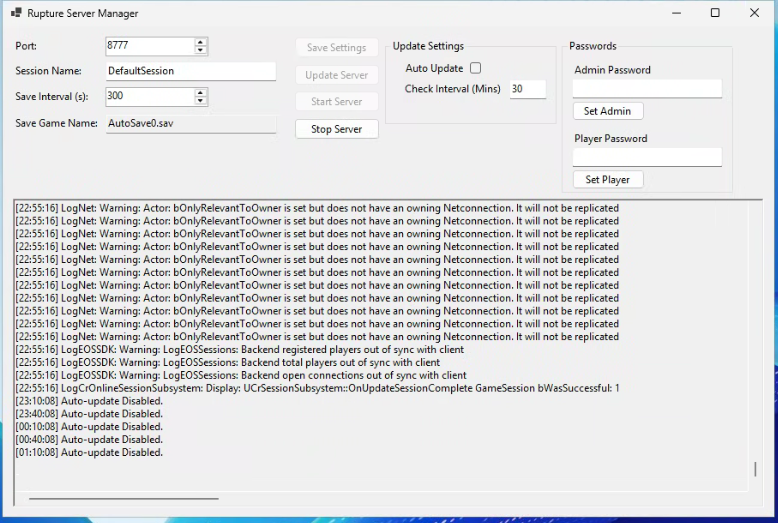
RuptureServerManager is a Windows desktop application designed to make installing, running, updating, and monitoring a Star Rupture Dedicated Server simple and reliable.
It uses SteamCMD in the background and provides a clean graphical interface for server operators.
¶ ✨ Features
- Start and stop the Star Rupture dedicated server
- Automatic SteamCMD download and setup
- Manual and automatic server updates
- Steam build update detection
- Automatic server restart after updates
- Live server console output
- Persistent configuration saved to disk
- Beginner-friendly Windows UI
¶ 🖥 System Requirements
Before installing, ensure you have:
- Windows 10 or Windows 11
- .NET 6.0 or newer
- Active internet connection
- Approximately 10–15 GB free disk space
¶ 📥 Installation Guide
¶ Step 1 – Download from GitHub (Recommended)
Always download the latest version from the official GitHub releases page:
https://github.com/Jimmy062006/RuptureServerManager/releases/latest
On the releases page:
- Download the latest ZIP or EXE release asset
- Save it to your computer
Avoid downloading source-code ZIPs unless you plan to build the application yourself.
¶ Step 2 – Extract Files
If you downloaded a ZIP file:
- Right‑click the ZIP
- Choose Extract All
- Extract to a folder such as:
C:\RuptureServerManager
Make sure all files remain in the same folder.
¶ Step 3 – Install .NET Runtime (If Needed)
If the application does not start, install the .NET Desktop Runtime:
https://dotnet.microsoft.com/download/dotnet/6.0
Choose .NET Desktop Runtime (x64).
¶ Step 4 – First Launch
Run:
RuptureServerManager.exe
On first launch:
- SteamCMD will be downloaded automatically
- Required folders will be created
- Default configuration files will be generated
¶ 📂 Folder Structure
After the first successful launch, the folder layout will look similar to this:
RuptureServerManager/
├─ config/
│  └─ RuptureServerManagerSettings.txt
├─ serverfiles/
│  ├─ DSSettings.txt
│  └─ steamapps/
│     └─ appmanifest_<AppID>.acf
├─ steamcmd/
│  └─ steamcmd.exe
├─ logs/
│  └─ server.txt
└─ RuptureServerManager.exe
¶ Folder Descriptions
| Folder | Purpose |
|---|---|
config/ |
Application-level settings |
serverfiles/ |
Star Rupture dedicated server files |
steamcmd/ |
SteamCMD binaries |
logs/ |
Server console output and logs |
¶ ⚙️ Configuration
¶ Application Configuration
Application settings are stored in:
config/RuptureServerManagerSettings.txt
This file contains:
- Server port
- Auto-update options
- Update check intervals
- UI preferences
Manual editing is possible but not recommended unless you know what you’re doing.
¶ Server Configuration
Game server settings are stored in:
serverfiles/DSSettings.txt
This file controls:
- Server name
- Admin and player passwords
- Player limits
- Gameplay rules
⚠ Always stop the server before editing this file.
¶ ▶️ Starting the Server
- Launch RuptureServerManager
- Click Start Server
- The server will launch using SteamCMD
- Live console output will appear in the application window
¶ ⏹ Stopping the Server
- Click Stop Server
- Wait for confirmation in the console output
Do not close the application while the server is starting or stopping.
¶ 🔄 Updating the Server
¶ Automatic Updates
When enabled:
- The manager periodically checks Steam for new builds
- If an update is found:
- The server stops automatically
- The update is installed
- The server restarts if it was running
¶ Manual Updates
- Click Update Server
- SteamCMD downloads the latest build
- The server restarts if previously running
¶ 🧾 Logs & Monitoring
Logs are stored in:
logs/server.txt
Use this file for troubleshooting and diagnostics.
¶ 🛡 Best Practices
- Back up
serverfiles/before updating - Stop the server before editing configuration files
- Keep RuptureServerManager updated
- Run only one server per folder
¶ ⚠ Known Limitations
- Windows only
- Requires a graphical interface
- Steam anonymous login only
¶ 🆘 Troubleshooting
¶ Server Will Not Start
- Verify .NET 6+ is installed
- Check
logs/server.txt - Confirm server files downloaded correctly
¶ Update Fails
- Check internet access
- Restart RuptureServerManager
- Verify folder permissions
¶ 📜 License & Credits
Licensed under AGPL‑3.0.
Community maintained – contributions welcome.
¶ ✅ Quick Start Checklist
- Install .NET 6+
- Download latest release from GitHub
- Extract files
- Launch RuptureServerManager
- Configure server
- Start server
Happy hosting! 🚀